
Identification in our e-services to change 12.5.2025: Users will be prompted to activate Suomi.fi Messages once they have identified themselves
As of 12 May 2025, you will be prompted to activate Suomi.fi Messages when you identify yourself with strong identification in the e-service of either Digital and Population Data Services Agency or another authority. These include our Name change service, Certificate service, Guardianship e-service, but also the e-services of other public administrations, such as MyTax and Traficom’s My e-Services. The aim of the change is to encourage people to switch over to receiving official mail primarily electronically.

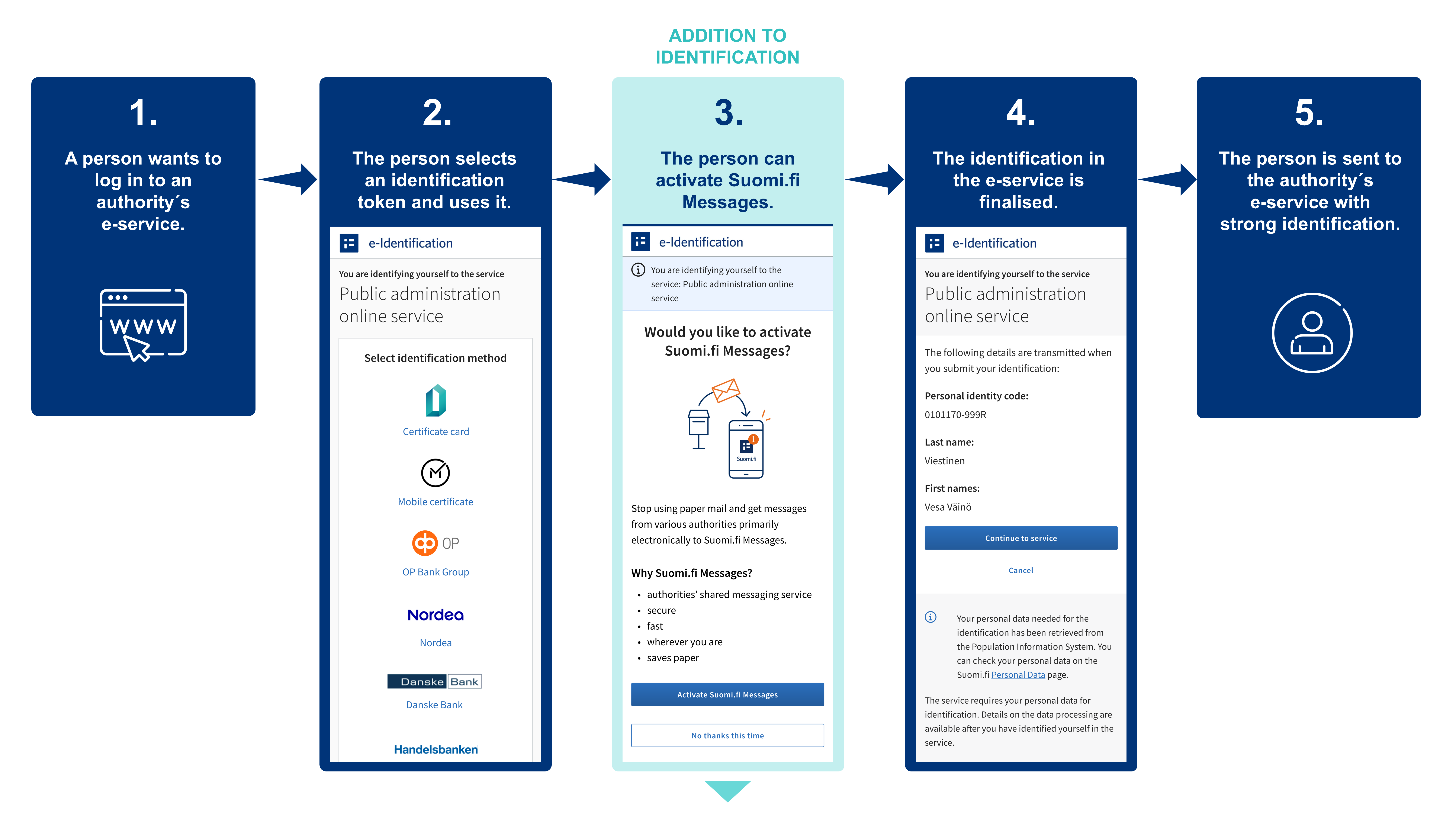
The prompt for the activation of Suomi.fi Messages will be displayed to all adults who do not yet have Suomi.fi Messages in use. It will appear when a user uses strong identification in a public administration e-service; that is, uses Suomi.fi e-Identification to identify themselves. An e-service user can activate Messages immediately after identifying themselves. If they wish, they can bypass the activation of Suomi.fi Messages and continue to identifying themselves in the usual manner.
The activation of Suomi.fi Messages saves time for both citizens and the authorities when the messages are sent quickly and securely to the right recipient. At the same time, it reduces the costs and environmental impacts related to paper mail.
How will the activation prompt change identification?
The change implemented in spring 2025 will not see Suomi.fi Messages be activated automatically for anyone. Instead, you can decide on the activation of the service yourself.
The activation prompt will be displayed to you if you are an adult and you have not yet activated Suomi.fi Messages.
You will see the prompt for the activation of Suomi.fi Messages whenever you use strong identification to identify yourself in an public administration e-service with Suomi.fi e-Identification.
The activation requires that a user enters their email address and confirms it within an hour. You will be sent a notification to your email each time you have received new mail in Suomi.fi Messages.
If you wish, you can skip the activation of Suomi.fi Messages and continue identification in the normal manner. You can also activate Suomi.fi Messages later.
Illustration of how identification in public administration e-services will change in 5.5.2025:
How can electronic messages be read?
- You can read the official messages received in Suomi.fi Messages in the Suomi.fi mobile application or by logging in to the Suomi.fi Web Service and going to "Messages" there.
- Identification takes place with online banking codes, a mobile certificate or the electronic certificate on an ID card.
- You will be sent a notification to your email whenever a new message arrives in Suomi.fi Messages. You will also receive notifications of incoming messages in the Suomi.fi mobile app if you have downloaded the app.
- You can later switch back to receiving paper mail by changing the settings for Suomi.fi Messages. The instructions can be found in the Suomi.fi.
You can activate Suomi.fi Messages at https://suomi.fi/messages or by downloading the Suomi.fi mobile application.
Further information
More information on Suomi.fi Messages: https://www.suomi.fi/ohjeet-ja-tuki/viestit
Further information on Suomi.fi e-Identification: https://www.suomi.fi/ohjeet-ja-tuki/tunnistus/mika-on-suomifi-tunnistus
What is Suomi.fi Messages?
Suomi.fi Messages is a secure electronic mailbox that replaces official paper mail. The service is used by several authorities, and its use is constantly increasing. Incoming messages can be read using the Suomi.fi mobile application or by logging in to the Suomi.fi Web Service at https://suomi.fi. This way, you can read incoming mail wherever you are.
Notifications of incoming messages are sent to the email address that you have provided to the service. Users of the Suomi.fi mobile application will also receive notifications directly through the app.
You can access Suomi.fi Messages by downloading the Suomi.fi mobile application or by logging in at https://suomi.fi/messages. Identification takes place with online banking codes, a mobile certificate or the electronic certificate on an ID card. By activating Suomi.fi Messages, you will also receive mail from various authorities electronically.
More information on Suomi.fi Messages: https://www.suomi.fi/instructions-and-support/messages
What does the transition to digital communication with authorities mean?
Finland will gradually move towards electronic communications with the authorities. From the beginning of 2026, official mail will chiefly be delivered digitally to everyone who uses electronic services. Persons of adult age who log into the authorities’ electronic e-services can use Suomi.fi Messages in connection with Suomi.fi e-Identification without separate consent, unless the service is already in use.
Those who cannot use digital services will continue to receive official mail on paper, unless they choose otherwise. A person can also cancel the reception of electronic messages with just a notification, after which mail will be sent by paper mail once again. If a person who has selected paper mail continues to use the e-services, an electronic mailbox will be created again for them after the deadline.
The transition to digital communication will bring significant benefits. This will save tens of millions of euros per year for society and make everyday life easier for citizens. Official mail will be available faster than before, can be found in one place and always be available.
Read more: https://dvv.fi/en/digital-first-project


